Internal system unit components.
Processor
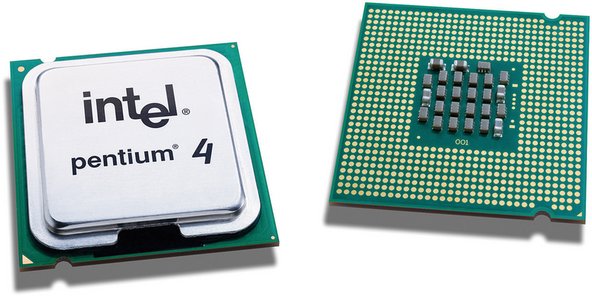
A processor is the hardware in a computer that carries out the instructions of a program by performing the basic input/output operations of the system. The functions of a processor is is to perform stored instructions which is called a program. The instructions are kept in the computer memory. There are four main steps that nearly all processors use in their operation. These are fetch, decode, execute, and write back.
Motherboard
The Motherboard is the main component in the computer which connects each hardware to its processor. This includes the central processing unit, the memory and also the connectors for the input and output devices.

BIOS
The basic input and output system is a set of routines that boots the operating system and can also set up the hardware. BIOS tests the system and prepares the computer for operation based on hardware and configuration settings of both the manufacturer and the user.

Power supply
The power supply is an internal hardware component used to supply the component of the computer with power. The power supply changes the current line from your home to a different current needed by the computer.

Heat sink and fan
Most computers have heat sinks. Heat sinks help the CPU cool and prevents it from over heating. Sometimes the heat sink can over heat too. To prevent this a fan is used. This keeps both the CPU and the heat sink at the right temperature. The fan transfers cool air across the heat sink, pushing hot air out of the computer.

Hard drive
The hard drive stores all data. It keeps the hard disk, where all files and folders are located. Data is stored on a pile of disks that are inside an encasement. The disks spin really fast so the data can be accessed straight away for anywhere on the hard drive.

Configuration
The configuration are the technical specifications of a computer. It is the choice of hardware, software, firmware, and documentation.

Ports
There are two different types of ports. The first is an Internet port. This is a number that shows what kind of protocol a server on the Internet is using. For example, web servers are usually on port 80.
The second type is a hardware port. This can be any of the ports that are on the back of a computer where devices are attached. These can be things like keyboards and printers.The most common ports are USB, Firewire and Ethernet.

USB
USB stands for Universal Serial Bus. It is used to connect devices such as keyboards, game controllers,printers, scanners and more. USB is faster than parallel and serial ports. When a computer sends data to a printer or an other device using a parallel port, it sends 8 bits of data at a time. These 8 bits are sent parallel to each other. The same eight bits could be being transmitted serially and they will be all in one row through a serial port.

RAM
RAM stands for Random Access Memory. It is made up of small memory chips that create a memory module. These are installed in to the RAM slots on the motherboard of a computer. When a programme is opened it gets loaded from the hard drive in to the RAM. This happens because the reading data from the RAM is faster that from the hard drive. Running the programme from the RAM of the computer allows them to run with no lag. The more RAM the computer has the more data can be loaded from the hard drive and this can speed up your computer.

ROM
This stands for Read-Only Memory. This is a memory containing instructions that the computer uses when is boots before the system loads. In PC's the instructions are are read from a programme in the ROM called the BIOS.

Cache
Cache stores information that was recently used so that it can be accessed faster at another time. Computers have different types of caching so that it can run faster which improves performance. Common caches are browser cache, dick cache and a processor cache.

Video Cards
Video cards give the CPU a break and help it run more smoothly by processing the graphics part of the processing load. It can help almost an program run more smoothly. The difference in performance can be more noticeable in image editing applications and also 3D games. Video Cards can speed up 2D and 3D graphics rendering. Programs like photo editors and web browsers benefit from a video cards 2D acceleration. However CAD design programs and video games benefit from a video cards 3D acceleration. Some programs rely completely on the video card and will not run if it isn't installed.

Peripherals
Printer
A printer is a device that transfers text and graphic information from a computer to paper. There are different kinds of printers and these are dot-matrix, inkjet and laser.
The dot-matrix printer strikes the page one line at a time. The inkjet printer sprays ink at the paper at close range as it rolls past. The laser printer uses a laser beam reflected from a mirror to attract ink to the paper as the sheet rolls by on a drum.

Scanner
A scanner is a device that captures images from photographic prints and similar sources for computer editing and display. Scanners can come in hand-held, feed-in, and flatbed types and for scanning black-and-white or colour. High resolution scanners are used for scanning high-resolution printing, but low resolution scanners are used for capturing images for computer display. Scanners usually come with software like Adobe's Photoshop product that lets you re-size and modify a captured image.

Twisted pair cabling
This is a type of wiring that have two separate insulated wires twisted together. There are two types that are shielded and unshielded. The shielded twisted pair has a wire mesh surrounding the wires that protects the transmission. The shielded twisted pair is used for older telephone networks and network and data communications. This reduces external interference. The unshielded twisted pair do not have a wire mesh to protect the wires.

Backing storage
Pen Drive
A pen drive is a portable USB device for storing and transferring audio, video, and data files from a computer. As long as the desktop has a USB port, and the pen drive works with the operating system, it should be easy to move the data from the hard drive to the device. If the pen drive is inserted one end of the drive into the USB port on a desktop or laptop it activates it. Once the drive is enabled, files can be copied and pasted into the memory.

Hard Drive A pen drive is a portable USB device for storing and transferring audio, video, and data files from a computer. As long as the desktop has a USB port, and the pen drive works with the operating system, it should be easy to move the data from the hard drive to the device. If the pen drive is inserted one end of the drive into the USB port on a desktop or laptop it activates it. Once the drive is enabled, files can be copied and pasted into the memory.
A hard drive is the computer's main storage device that constantly stores all data on the computer. It has one or more hard drive platters inside of an air sealed casing. Hard drives are in an inside drive at the front of the computer. They connect to the motherboard using either an ATA, SCSI, or SATA cable and power cable. Data sent to and from the hard drive is simplified by the disk controller. This tells the hard drive what to do and how to move the things inside the drive. When the operating system needs to read and write data, it examines the hard drives File Allocation Table (FAT) to decide file location and available areas.
These components communicate in different ways. The main way they communicate is through the connections in the motherboard. These are SATA connectors and IDE connectors.
The components that use SATA connectors connect using cables to storage devices. These include disk drives, solid-state drives and optical drives.
IDE connectors are not really found in computers today but they were used to connect to olders hard drives. Many optical drives supported IDE conectors too.

www: Your P1 post does explain the function of computer hardware components.
ReplyDeleteebi: In addition to the descriptions, you must identify communication between components as requested in the original task.
www: well done Lara, communication has been added. P1 achieved.
ReplyDelete